The 13-Step Session Journey
From your first click to post-delivery review — TrainerVault guides you through every step of creating a truly outstanding session.
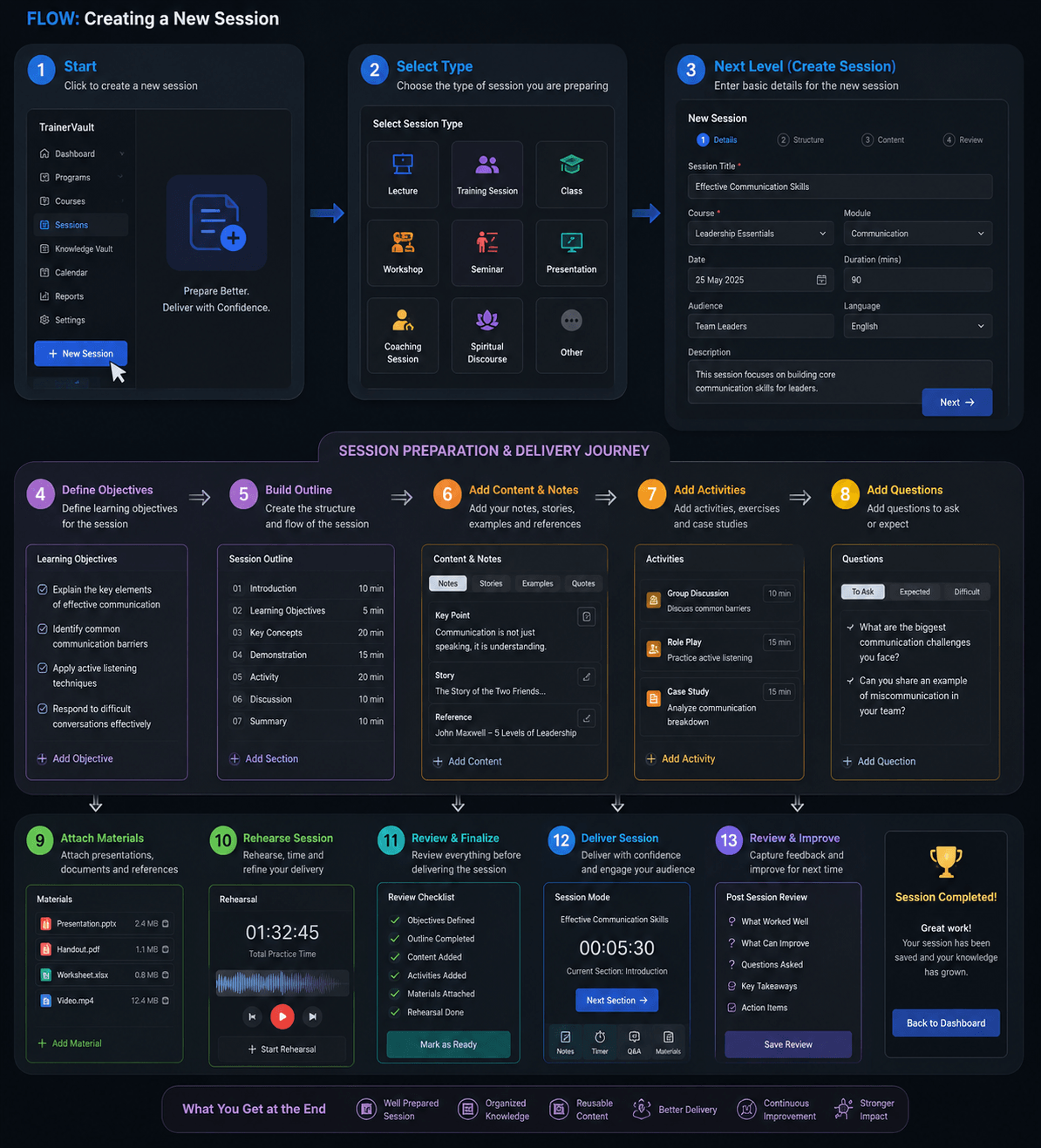
TrainerVault is the intelligent session preparation and delivery platform for trainers, educators, coaches, and speakers. Transform the way you plan, structure, rehearse, and deliver your sessions.
Whether you're a university lecturer, corporate trainer, life coach, or spiritual speaker — TrainerVault has a session type designed for your needs.
From your first click to post-delivery review — TrainerVault guides you through every step of creating a truly outstanding session.
Each of the 13 steps is designed to build your session systematically — nothing is left to chance.
Click New Session and choose from 9 session types — Lecture, Training, Class, Workshop, Seminar, Presentation, Coaching, Discourse, or Other.
Set the session title, link it to a course and module, set date, duration, audience level, and language.
Define clear, measurable learning outcomes. Know exactly what your audience will take away from your session.
Create a timed section structure: Introduction, Key Concepts, Demonstration, Activity, Discussion, and Summary.
Add Notes, Stories, Examples, References, and Key Points with rich multi-tab content tools.
Include Group Discussions, Role Plays, and Case Studies with time allocations and instructions.
Build a bank of questions — those to ask the audience, expected answers, and challenging questions to anticipate.
Attach presentations, PDFs, handouts, worksheets, and videos to the session for easy access during delivery.
Time your delivery with the built-in rehearsal module. Track total practice time and refine until you're ready.
Run through the pre-delivery checklist: objectives defined, outline complete, content added, materials attached, rehearsal done.
Use Delivery Mode with a live timer, section-by-section navigation, quick-access Notes, Q&A, Timer, and Materials panels.
Capture post-session feedback: What Worked Well, What Can Improve, Key Takeaways, and Action Items. Grow with every session.
Everything you need to take your sessions from ordinary to extraordinary.
Organise sessions into Programs and Courses. Build reusable curricula that grow with your practice.
A personal library of your best stories, examples, case studies, and references — ready to insert into any session.
Run sessions with a live countdown timer, section navigator, and instant access to your notes, Q&A bank, and materials.
View all upcoming sessions in a calendar view. Never miss a session and always be prepared days in advance.
Track your delivery history, rehearsal hours, and session completion trends to understand your growth over time.
Duplicate and remix previous sessions. Build template libraries and never start from scratch again.
Join trainers and educators who use TrainerVault to deliver sessions that inspire, engage, and create lasting impact.