How to get Diagnostics & Debug Logs
To help us identify and fix your issue quickly, please include the following in your email:
- Screenshots / Screen Recordings: Attach images showing the error state or incorrect behavior.
- Steps to Simulate: List the exact actions/taps required to reproduce the bug.
- App Diagnostics & Logs: Include the local device debug events (permissions, OCR errors, database state).
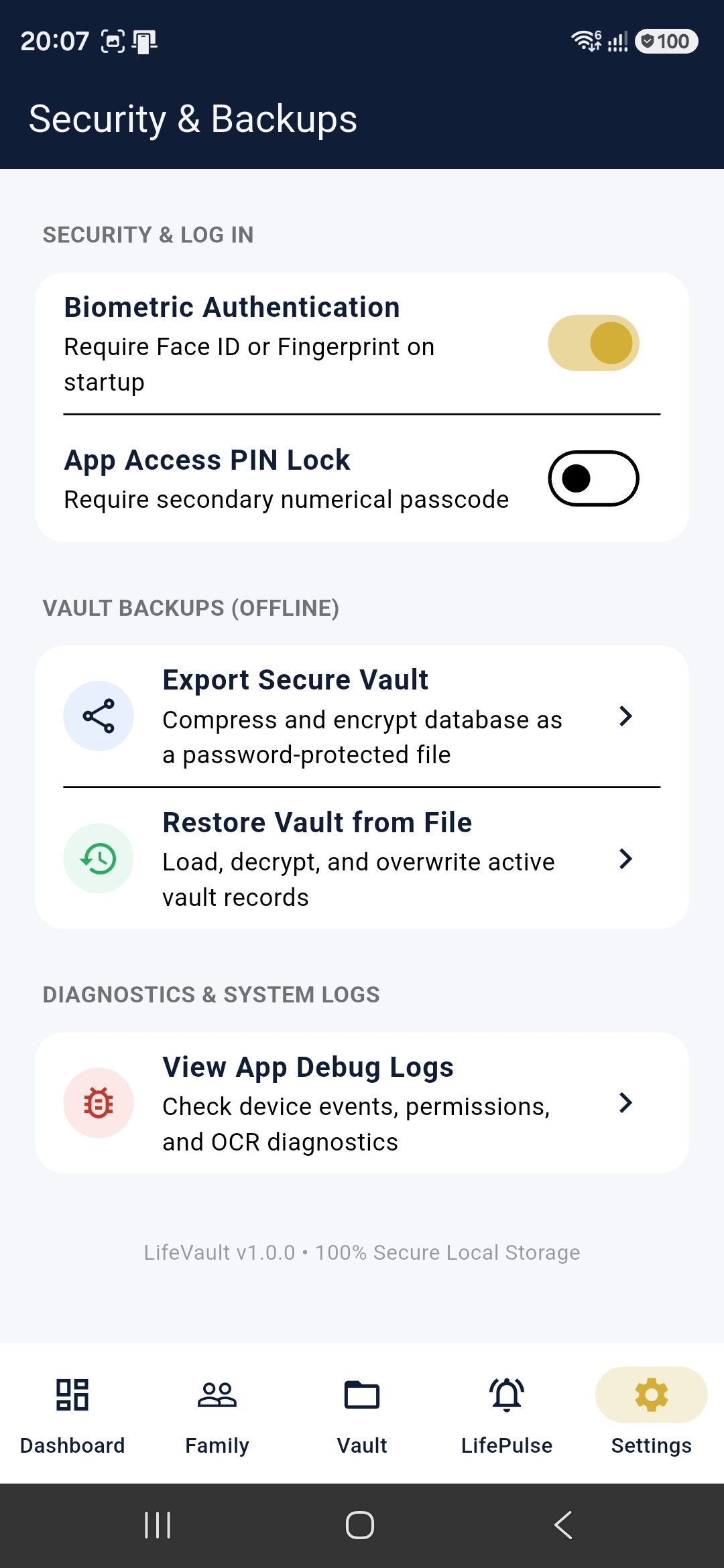
Navigation Steps:
- Open the My LifeVault app on your device.
- Tap on the Settings tab at the bottom right corner of the navigation bar.
- Scroll down to the Diagnostics & System Logs card section.
- Tap on View App Debug Logs to view, copy, or export the log stream.
Refer to the settings navigation map below:
Contact Our Support Team
Please email your queries, bug reports, feature suggestions, or diagnostics details to our support email address:
We prioritize privacy above all. Your support request email is handled securely and is never shared with third parties.